Devlog · Algorithm Bot · 7 min read
Algorithm RAG Development Process and Final Output
Completing the final system with LangChain FAISS
GitHub Link: https://github.com/Hun-Bot2/Algorithm-RAG-Engine
This continues from the previous post.
Results After Refinement
Before
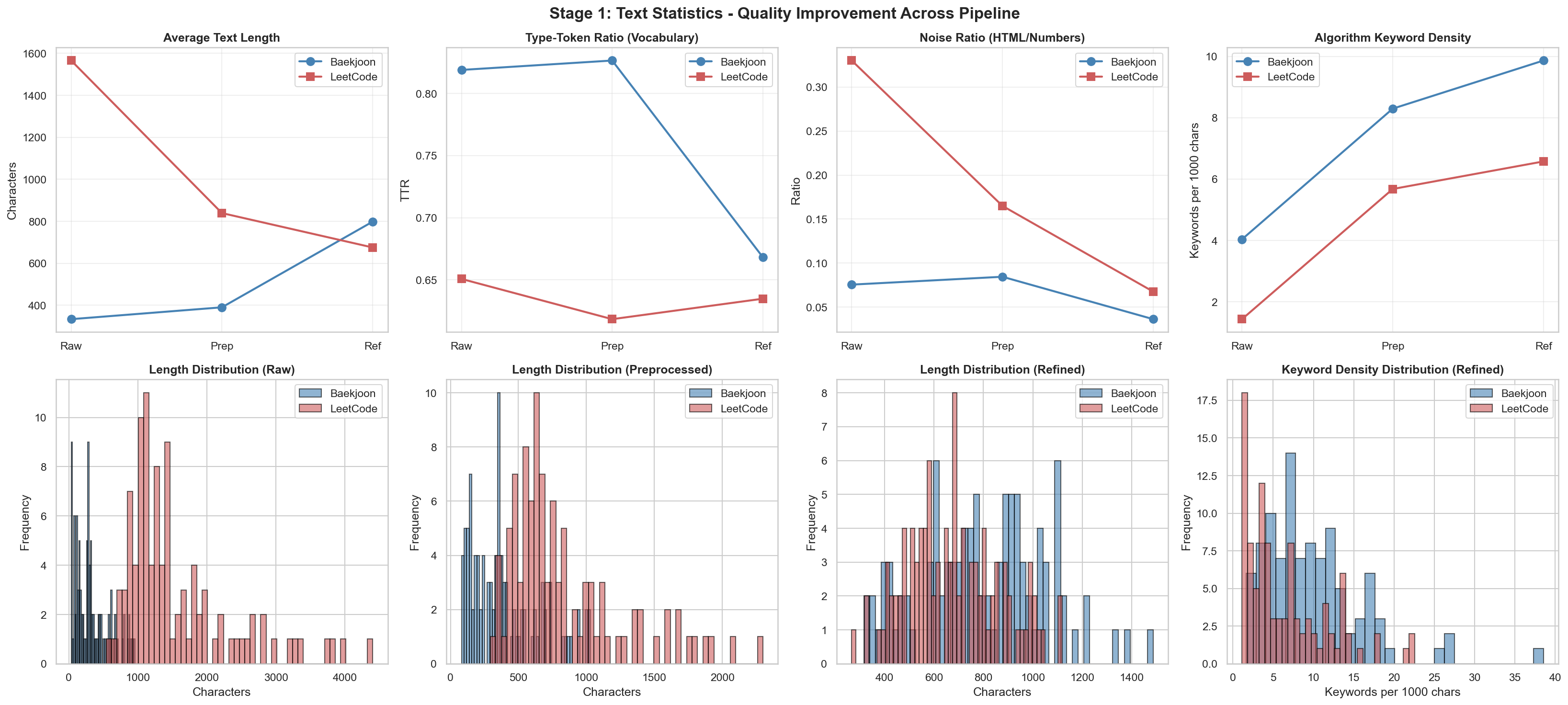
After
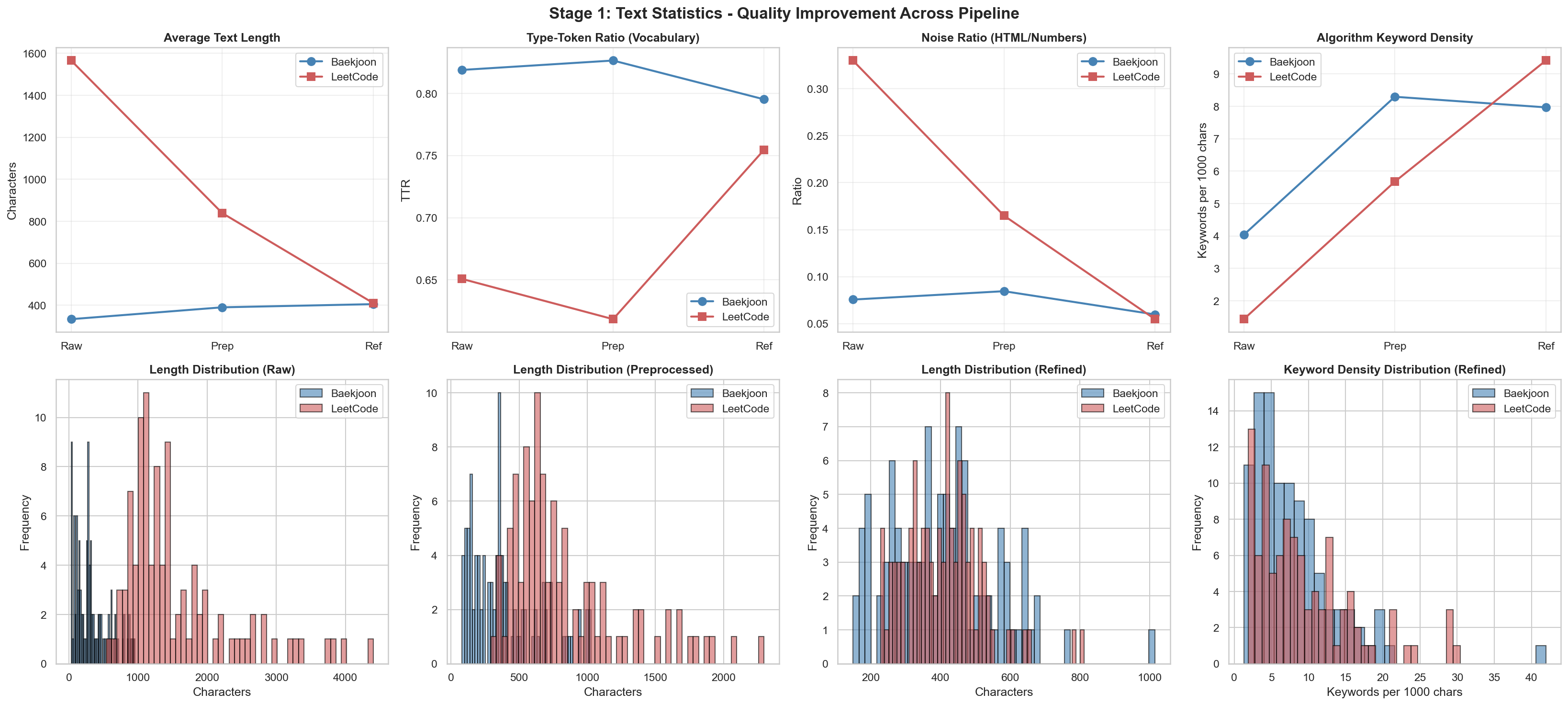
Before
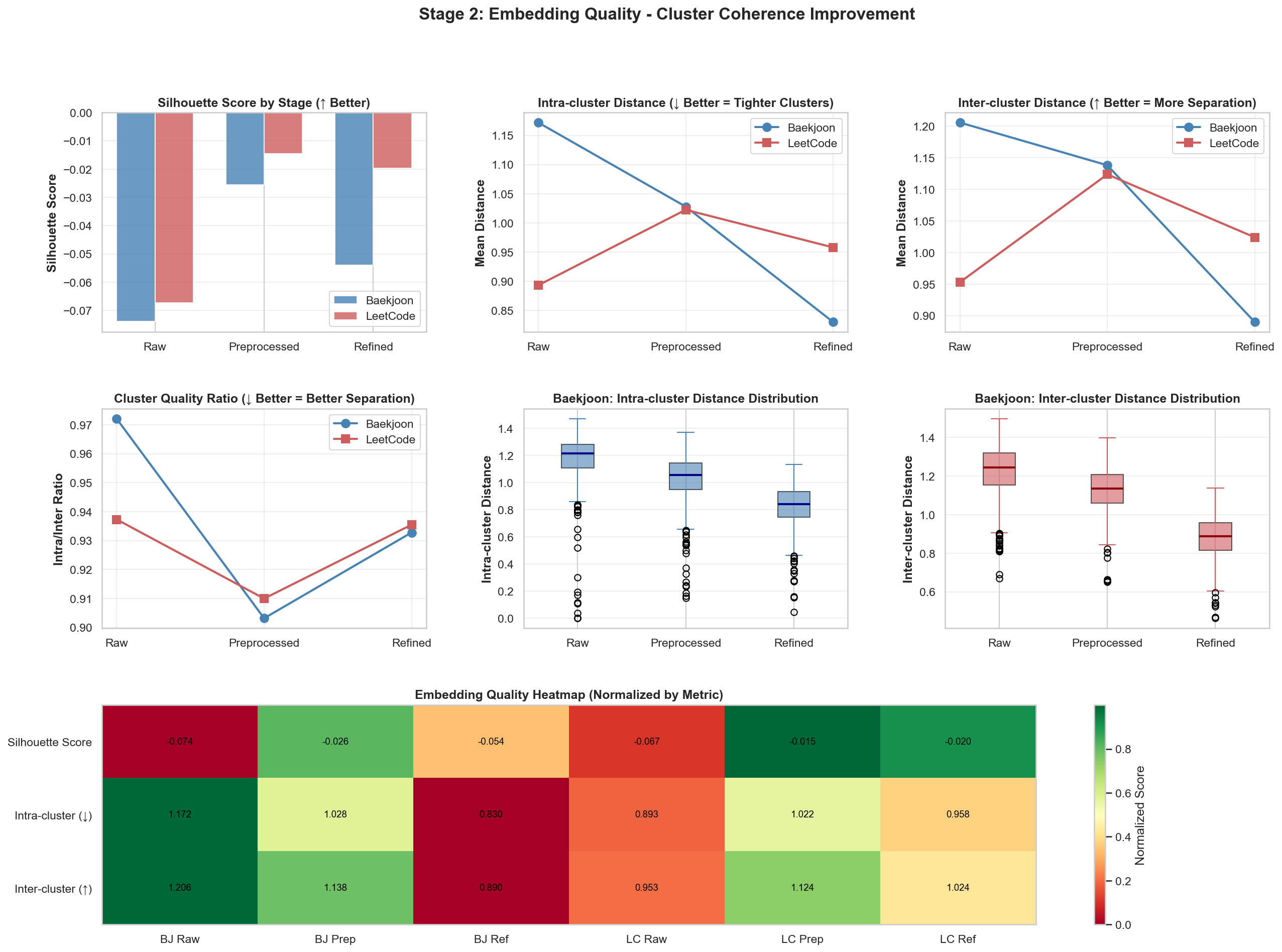
After
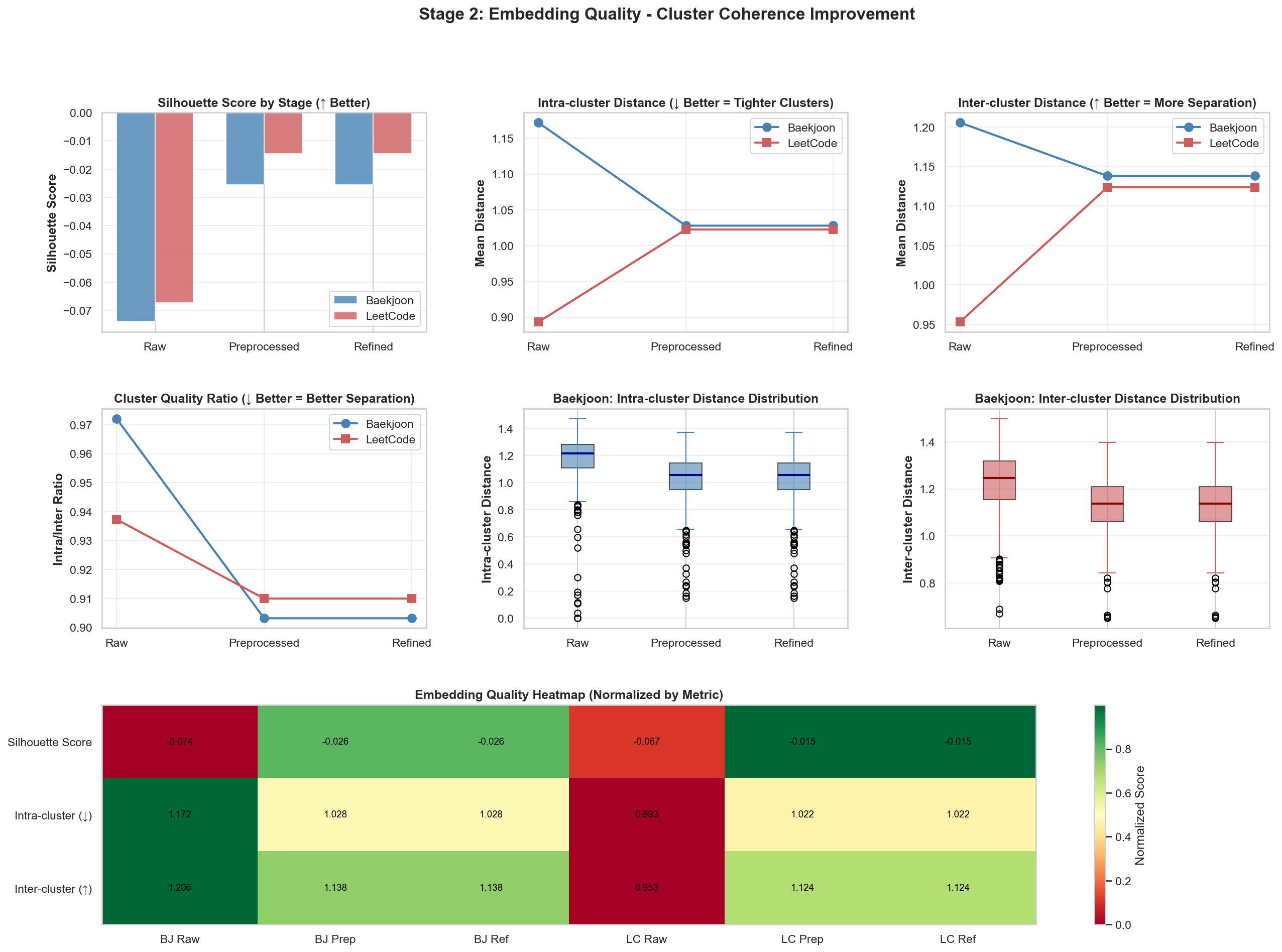
There were visible changes in the two charts above. The other result values were fairly similar, so you can check them in the repository.
Now that I have studied embeddings at a basic level, I will put around 3,000 actual LeetCode problems into the system and build the RAG pipeline.
RAG System with LangChain FAISS
I changed direction from the original plan of building the RAG system with Pinecone and decided to build it using LangChain’s FAISS.
Why did I choose LangChain FAISS instead of Pinecone? LeetCode only has around 3,000 problems in this dataset, so I thought using FAISS through LangChain would be more efficient than using Pinecone.
I also separated the Slack Bot that had been attached to my personal study repository and merged it into the RAG repository. I considered a monorepo, but for future extensibility I decided to create and manage a separate repository.
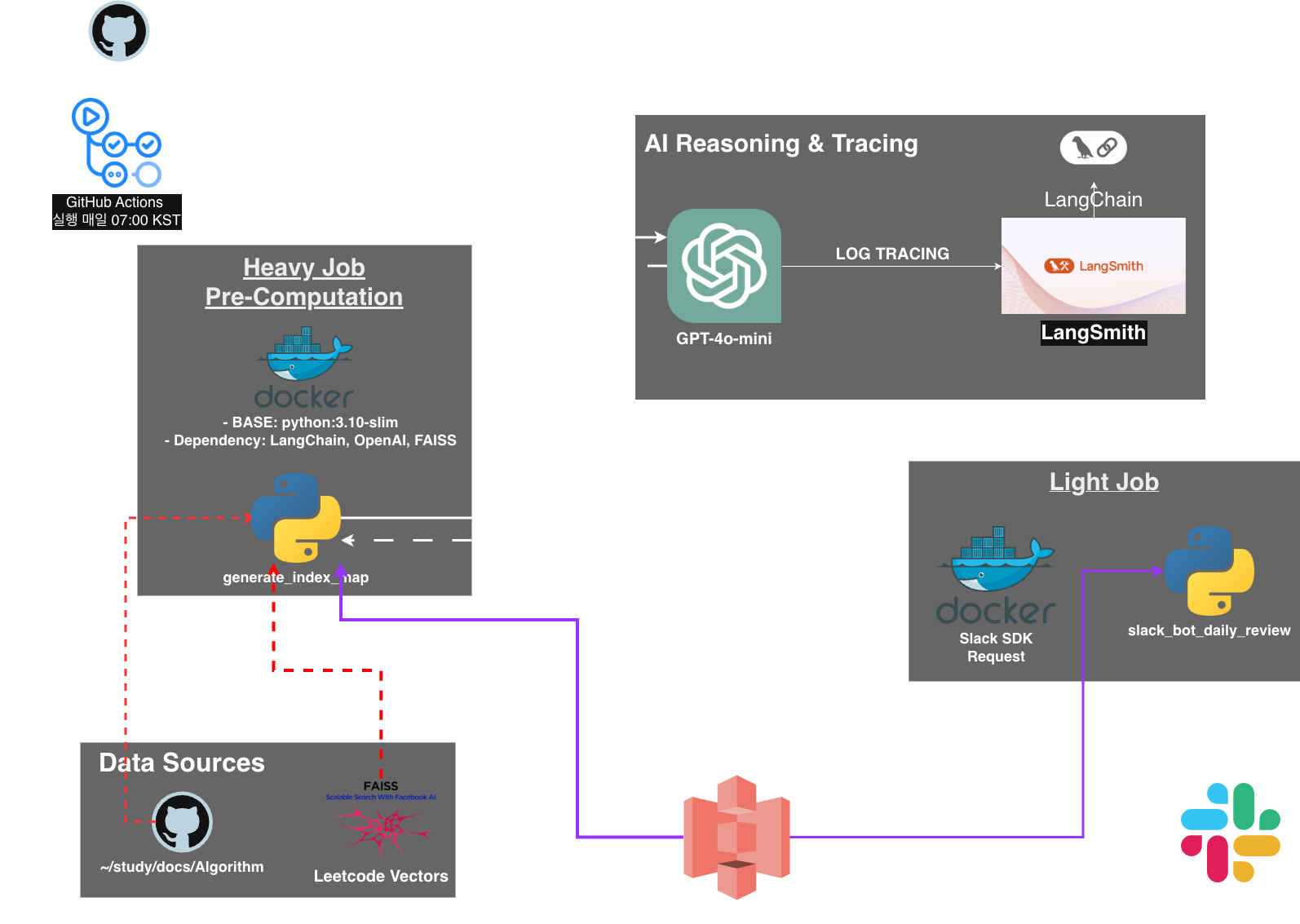
I already explained the overall architecture in the previous post, and the GitHub repository contains detailed documentation. In this post, I will focus on why I made certain choices and describe the problems I ran into.
The architecture is shown above. Where does FAISS fit in? It receives LeetCode problems, converts them into embedding vectors, stores them in a FAISS index, and uploads the index to GitHub as a package. It is also available in the releases.
Why FAISS?
First, the LeetCode problems I collected were around 3,000 free problems, and the problem data was stored as a JSONL file. Of course, asking an LLM to read all of these problems and find similar ones would be inefficient. For “search,” I needed a place to vectorize and store the data, so I looked into local vector DB options.
| Category | FAISS | ChromaDB | LanceDB |
|---|---|---|---|
| Operating architecture | In-memory / Library | SQLite-based DB | Arrow-based Serverless |
| Data scale | Optimized for large scale, 10^6+ | Suitable for small to medium scale | Suitable for medium to large scale |
| Metadata filtering | Weak by default, manual implementation needed | Very strong and easy | Efficient filtering support |
| Deployment ease | One binary file is enough | DB file structure must be managed | Separate file management needed |
| Search speed | Best, low-level optimization | Average, SQLite overhead | High, zero-copy reads |
ChromaDB: An open-source vector store that uses SQLite as its engine. It is very easy to use in a Python-native environment, and metadata filtering is strong.
LanceDB: Based on the Apache Arrow format and oriented toward serverless usage. Disk I/O efficiency is extremely high, so performance degradation is small even as data grows.
FAISS (Facebook AI Similarity Search): A high-performance similarity search library developed by Meta, formerly Facebook. It is closer to an algorithm library than a database, and its in-memory search speed is overwhelming.
Why Use FAISS When the Data Is Small?
- I wanted to try it while studying LangChain. See the third blog post for context.
- I needed a vector DB suitable for GitHub Actions. FAISS is a simple library where I only need to manage the index file,
.faiss. - The problem set I built will not be updated frequently. Once built, it will mostly be read-only, so I chose FAISS for speed.
Why Use S3 as the Artifact Store? (vs GitHub Artifacts)
Question: GitHub Actions already has a file storage feature called Artifacts, so why use AWS S3?
- Data persistence: GitHub Artifacts are deleted after a certain period, usually 90 days by default, while S3 can store data permanently.
- Decoupling between jobs: I physically separated the execution environments of the heavy job and light job to keep the system flexible. By using S3 as an intermediary to exchange data, each job can run independently without depending on the other’s state.
- External extensibility: If I later build a web dashboard in addition to Slack, S3 data can be loaded directly through an API.
Decoupling Heavy & Light Jobs
- Heavy Job: Collect LeetCode problems, generate embedding vectors, and build the FAISS index. This job takes time and does not run often.
- Light Job: Load the FAISS index, search for similar problems, and send the similar problems plus LLM-generated reasons to Slack. This job runs often and needs quick response.
Changes
Originally, when I solved an algorithm problem and committed it, I received notifications according to the scheduled review cycle. But if I assume two to three new problems plus two to three review problems every day, the volume quickly becomes unmanageable.
For example, day 1 would have two new problems plus two reviews. If I solve two more problems on day 2, that adds two more problems and two reviews. By day 3, I might have six review problems plus new study problems. I judged that I could not realistically handle that, so I removed the review cycle.
The flow changed to this:
-
Trigger: Run only when I solve and commit a problem today or yesterday.
-
Action: Recommend the LeetCode problem most similar to the Baekjoon problem I just solved.
-
Goal: Shift the goal toward applying learned concepts to problems on another platform, LeetCode.
Introducing GitPython to Fetch Only the Latest Commit Changes
Structurally, fetching every file every time is inefficient, so I changed the system to fetch only files changed in the latest commit.
def get_latest_changed_files(repo_path: str, target_subdir: str) -> List[str]:
    """
    Detects files changed in the latest commit (HEAD) within the target subdirectory.
    """
    print(f"[INFO] Checking git history in: {repo_path}")
    changed_files = []

    try:
        repo = Repo(repo_path)

        # Ensure we have commits to compare
        if not repo.head.is_valid():
            print("[WARN] No valid HEAD found (empty repo?). Scanning all files.")
            return get_all_files(repo_path, target_subdir)

        head_commit = repo.head.commit

        # If no parents (first commit), scan all files in the tree
        if not head_commit.parents:
            print("[INFO] First commit detected. Scanning all files.")
            for item in head_commit.tree.traverse():
                if item.path.startswith(target_subdir) and item.path.endswith((".md", ".mdx")):
                    full_path = os.path.join(repo_path, item.path)
                    changed_files.append(full_path)
        else:
            # Compare HEAD with HEAD~1 (Previous commit)
            parent = head_commit.parents[0]
            diffs = parent.diff(head_commit)

            for diff in diffs:
                # We only care about added (A) or modified (M) files
                # diff.b_path is the new path. If deleted, it might be None or verify deleted_file flag
                if diff.b_path and not diff.deleted_file:
                    if diff.b_path.startswith(target_subdir) and diff.b_path.endswith((".md", ".mdx")):
                        full_path = os.path.join(repo_path, diff.b_path)
                        changed_files.append(full_path)
    except Exception as e:
        print(f"[ERROR] Git processing failed: {e}")
        print("[INFO] Falling back to scanning all files.")
        return get_all_files(repo_path, target_subdir)

    return changed_files
Adding Python Logic to Avoid Duplicate LeetCode Recommendations
# Search
        search_limit = MAX_RECOMMENDATIONS + 2  # Buffer to avoid self-match
        docs_and_scores = vectorstore.similarity_search_with_score(
            user_prob["query_text"],
            k=search_limit
        )

        recs = []

        # Avoid Duplicates & Self-Match
        seen_title= set()

        user_title_clean=re.sub(r'[^a-zA-Z0-9가-힣]', '', user_prob["title"].lower())

        for doc, score in docs_and_scores:
            if len(recs) >= MAX_RECOMMENDATIONS:
                break

            rec_title=doc.metadata.get("title", "Unknown")
            rec_title_clean=re.sub(r'[^a-zA-Z0-9가-힣]', '', rec_title.lower())

            if user_title_clean in rec_title_clean or rec_title_clean in user_title_clean:
                continue  # Skip self-match
            if rec_title_clean in seen_title:
                continue  # Skip duplicates

            seen_title.add(rec_title_clean)
            ...
Notification (Actual Response)
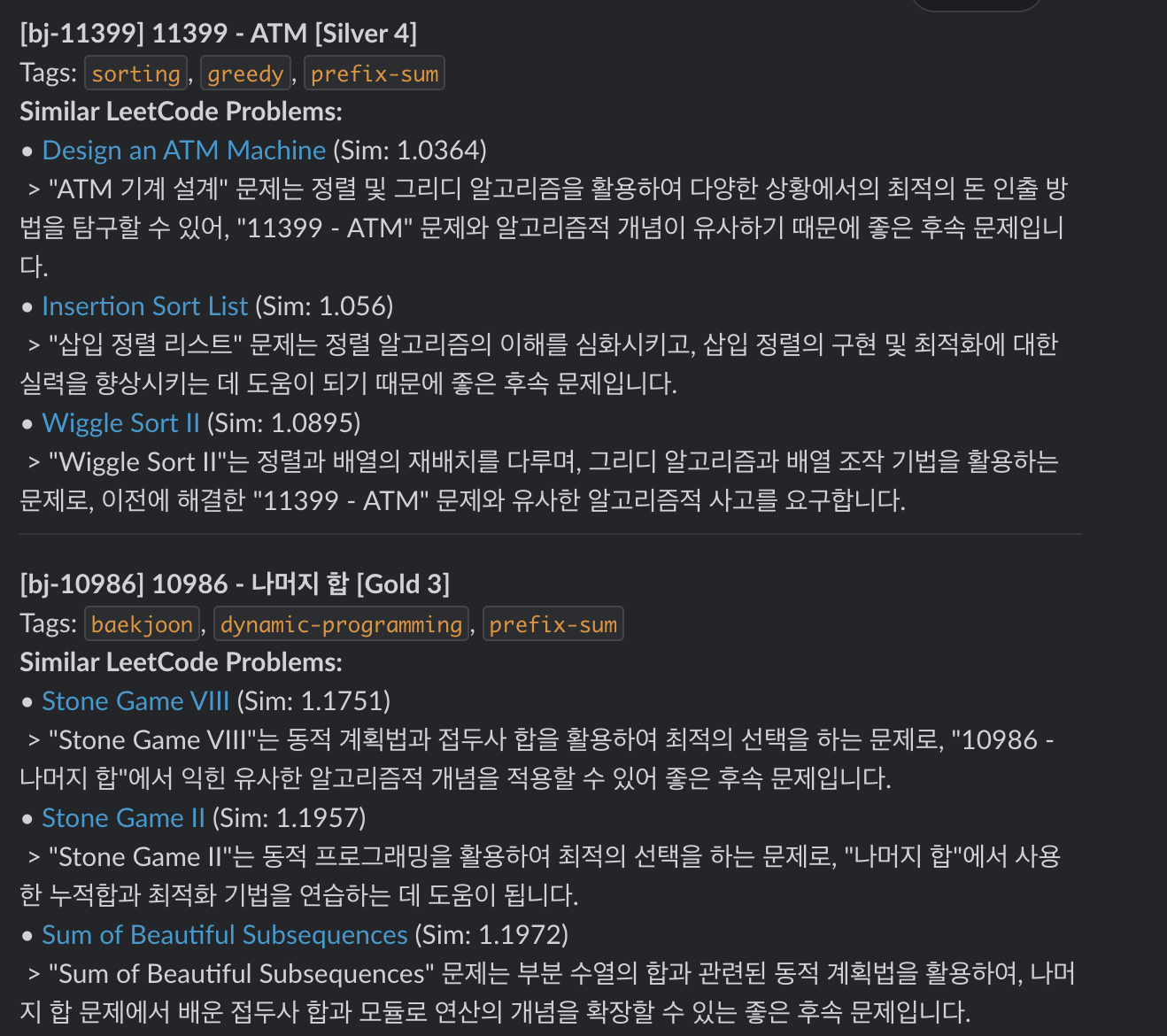
Closing
With this, the Algorithm RAG system is complete. Through this project, I was able to understand vector search technology and how to apply a RAG system in practice.
The next additions will probably be the following four items:
- Make it usable without initial environment variable setup.
- Build it in a form other people can use.
- Visualize the built LeetCode problems as a growing tree: when I solve a problem, the tree grows; solved problems become glowing leaves; difficulty is represented with different colors.
- Graph network visualization.
I will continue using the system, improve it over time, add more problems, and develop it into a tool that helps with algorithm study. Thank you.
Anonymous feedback
Leave a note about this post without a GitHub account. It is never published — only the author reads it.
Comments