Devlog · on-the-block · 8 min read
On-The-Block Service Devlog 03: Admin Page & Chat
On-The-Block service devlog 03: Admin page and chat
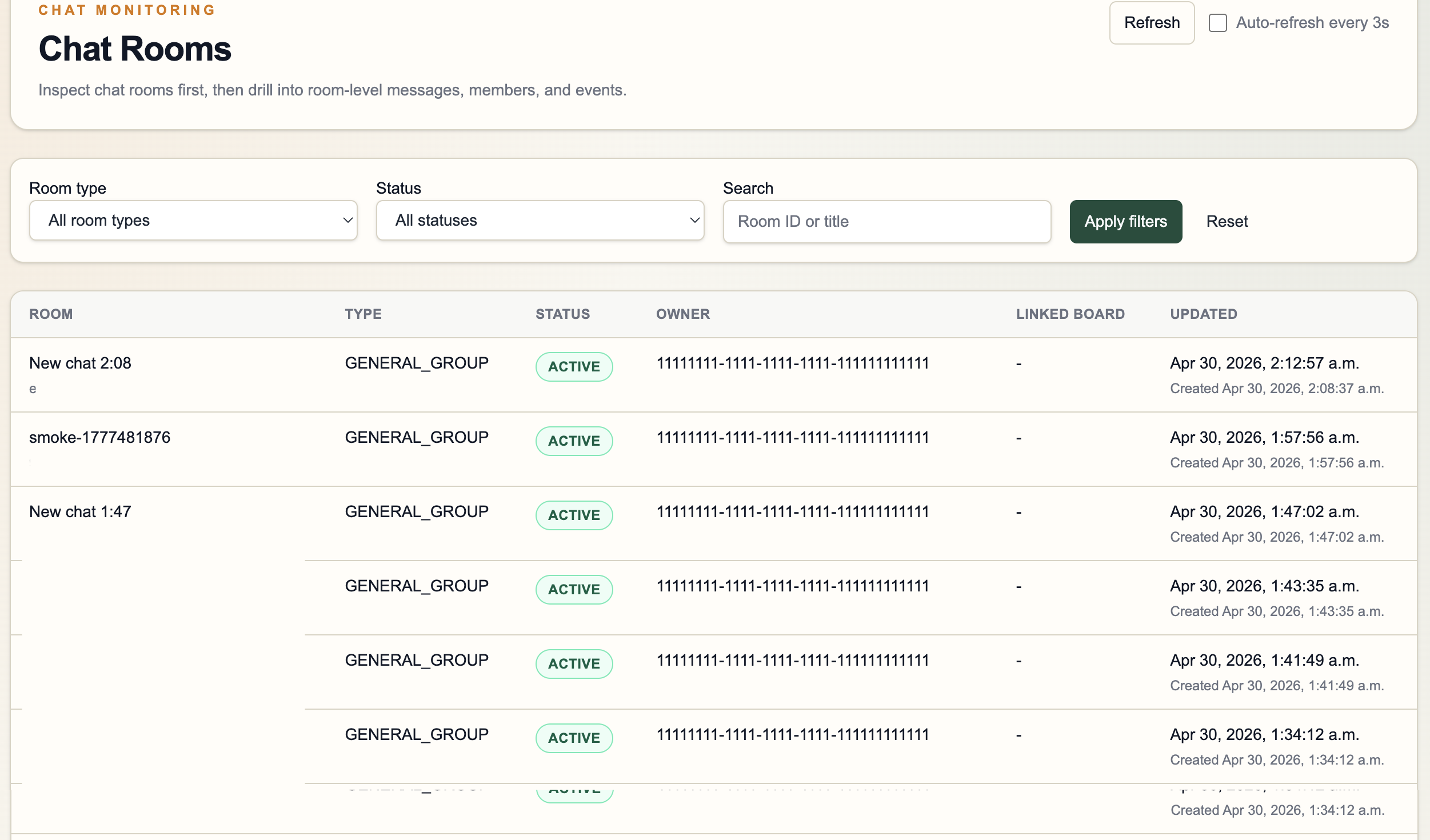
Building the Admin Page
While developing, checking chat records through SQL queries in Docker every time was annoying. So I built a web page where I can visually inspect records more conveniently. I use it locally during development. Once I start setting up GCP, I plan to use GCP monitoring services instead.
Chat System Cleanup and Additions
In this post, I want to organize what I worked on and clarify what needs to be developed next.
1. Work Done in This Session
Main issues solved in this session:
- Messages are stored even during concurrent send situations.
- Room list responses now match the proto contract.
- Messages are not missed when streams reconnect.
- Pagination is preserved even when there are rooms without messages.
- Local multi-user testing.
2. Strengthening Room-Level Message Sequencing
The first problem was message order under concurrency.
Each room uses a monotonically increasing sequence_no, and the (room_id, sequence_no) combination must always be unique.
Simply using MAX(sequence_no) + 1 works in single-user tests, but it is not safe when multiple users send messages to the same room almost simultaneously.
Problem
Two concurrent send requests can create the following situation:
- Read the same current max sequence.
- Calculate the same next sequence.
- A race condition occurs during insert.
As a result, duplicate-key errors can occur or message ordering can break.
Solution
I modified the PostgreSQL repository so the next sequence is assigned inside a transaction and protected with a transaction-scoped advisory lock keyed by room_id.
- Allow only one writer per room during sequence assignment.
- Do not serialize different rooms.
- Secure stable message ordering inside the room.
Why This Approach?
This keeps PostgreSQL as the source of truth and avoids introducing Redis or a separate sequencing system before it is truly needed in v1.
3. Completing ListMyRooms.last_message
The proto already exposed last_message inside ChatRoomSummary, but the backend response was not filling it.
Changes
I added LastMessage to the room-summary domain model, and updated both the memory repository and PostgreSQL repository to fill it.
On the PostgreSQL side, ListRoomsByUser now uses LEFT JOIN LATERAL to fetch the latest message for each room.
The gRPC layer maps it to LastMessagePreview, including:
message_idmessage_typecontent_previewsender_user_idsequence_nosent_at
Deleted messages are still sanitized before being exposed externally.
4. Fixing the Room List Pagination Bug
After connecting last_message, a bug appeared.
Flutter could load page 1 of ListMyRooms, but page 2 failed with the following error.
sql: Scan error on column index 13, name "message_type": converting NULL to string is unsupportedRoot Cause
Rooms without any messages produce NULL values from the LEFT JOIN LATERAL result.
The repository scan logic safely handled some nullable columns, but message_type was still scanned into a non-nullable Go type.
That caused:
- Page 1 might work.
- If page 2 included old rooms without messages, it crashed.
- Old rooms never appeared in the Flutter room list.
Fix
I changed message_type to scan through a nullable wrapper first, and only create LastMessage when an actual message row exists.
Regression Test Added
PostgreSQL repository tests now explicitly verify:
- one room with a last message
- one room with no messages
This kind of test matters because behavior can look fine in a small happy-path demo but break when real data contains rooms in different states.
Stream Logic Improvement
The stream path now works in this order:
- Verify active membership.
- Subscribe to room pub/sub.
- Catch up messages after
after_sequence_nothrough a PostgreSQL forward query. - Buffer messages by
sequence_no. - Flush only contiguous messages in order.
- If a gap is detected while live messages arrive, backfill again from the repository.
To support this, I added a new repository method:
ListMessagesAfter
This method is implemented in both repositories:
- in-memory repository
- PostgreSQL repository
Why This Change Matters
This makes reconnect/resume behavior safer when:
- the client misses many messages while disconnected
- one or more catch-up batches are needed
- a live message arrives before a previously missed sequence reaches the stream
The implementation is still suitable for v1:
- pub/sub remains simple and replaceable
- PostgreSQL remains the authoritative source
- no Redis dependency is introduced
5. Local Runtime Issue That Looked Like a Flutter Bug
Not every failure was a code bug.
At one point, Flutter could load the room list, but message sending failed. It looked like the UI Enter button was broken.
After tracing the backend directly, the real cause was:
- an old
chat-serviceprocess was still running on port9090 - Flutter was communicating with that stale binary
- the stale binary still contained the old broken SQL path
This left a useful lesson:
- If transport works but only a specific operation fails strangely, check the actual running server process before blaming the client.
The smoke client and direct process inspection helped confirm this quickly.
6. Improving Local Multi-User Chat Testing
I also extended the smoke client.
Before
It only performed a short end-to-end smoke check:
- create room
- join room
- send message
- get messages
- mark as read
After
Now it can:
- join two additional local test users in smoke mode
- run in interactive
chatmode - join an existing room as another member
- stream live messages in the terminal
- send messages typed in the terminal to the room
As a result, it became much easier to test:
- Flutter-to-terminal live chat
- multi-user streaming behavior
- reconnect scenarios
7. Verification Strategy
This session relied heavily on incremental verification, not “finish everything and test later.”
Verification included:
- service tests
- gRPC handler tests
- PostgreSQL repository tests
- migration integration tests
- smoke-client checks
- direct runtime validation against a Docker PostgreSQL instance
At the end, the full test suite passed with PostgreSQL-backed tests enabled.
8. What Improved
From a user perspective, the service became more stable in these areas:
- message sending is safer under concurrent usage
- room lists return richer summary data
- room list pagination no longer breaks when rooms have no messages
- reconnect/resume streaming is less likely to lose messages
- local multi-user validation is much easier
From an engineering perspective, the tricky parts are now protected by stronger tests, making the repository more trustworthy.
9. Next Work
This session improved correctness, but a few tasks remain before the service feels mature.
Likely next steps:
- verify Flutter reconnect behavior under the new stream semantics
- decide whether to update
chat_rooms.updated_atwhen a new message arrives, for room sorting - strengthen message validation rules for empty text / image payload combinations
- plan future auth/JWT migration while keeping v1 request-body
user_id
Future Plan: File Upload
GCP Cloud Storage Integration
Implementation Plan
I plan to add the ability to send images and files in chat rooms.
- Store files with a GCP Cloud Storage bucket.
- Send the stored file URL as a message.
Development Approach
Before AI:
- Search other blogs for references.
- Read official documents and configure everything manually.
- Document every step myself.
Now:
- Explain the official docs and my situation to AI.
- Let AI find and provide necessary information.
- Get help with setup steps.
- Detailed separate documentation becomes less necessary.
Current Issue
File Send Error: message_type = "FILE"
Error when sending a PDF file from the Flutter client:
{
  "timestamp": "2026-05-03T14:25:09.975066Z",
  "feature": "chat",
  "screen": "groupchat_room",
  "operation": "send_file",
  "userFacingMessage": "Could not send file.",
  "technicalMessage": "create_content_type=application/pdf put_content_type=application/pdf detail=grpc INTERNAL: ERROR: invalid input value for enum message_type: \"FILE\" (SQLSTATE 22P02)",
  "currentUserId": "11111111-1111-1111-1111-111111111111",
  "roomId": "38496f46-7b2c-4dd5-adc5-ffc465e7467f",
  "grpcStatusCode": "INTERNAL",
  "grpcStatusMessage": "ERROR: invalid input value for enum message_type: \"FILE\" (SQLSTATE 22P02)",
  "endpointHost": "127.0.0.1",
  "endpointPort": 9090
}
Root Cause
Error analysis:
- GCS upload URL creation succeeded.
- File upload succeeded.
create_content_typeandput_content_typeboth matched asapplication/pdf.- Backend failed when writing the message row:
invalid input value for enum message_type: "FILE".
Problem:
- App code now sends
MESSAGE_TYPE_FILE. - The database
message_typeenum does not yet define the'FILE'value.
Fix
1. Modify Directly With SQL (Recommended)
DO $$
BEGIN
  IF NOT EXISTS (
    SELECT 1
    FROM pg_type t
    JOIN pg_enum e ON e.enumtypid = t.oid
    WHERE t.typname = 'message_type'
      AND e.enumlabel = 'FILE'
  ) THEN
    ALTER TYPE message_type ADD VALUE 'FILE';
  END IF;
END $$;
2. Apply Through Migration File
go run ./cmd/migrate -dsn "$CHAT_DB_DSN" -path migrations/002_add_file_message_type.sql3. Verify
SELECT enumlabel
FROM pg_enum e
JOIN pg_type t ON t.oid = e.enumtypid
WHERE t.typname = 'message_type';
Expected result:
TEXTSYSTEMIMAGEFILE
After this, PDF sending should work normally.
This error is not Flutter now. It is the DB enum lagging behind the backend code.
Images and files also need to be sent in a form tied to the room ID.
- Client selects image/file.
- Client requests upload permission from server.
- Server issues a signed URL or upload token.
- Client uploads directly to object storage/CDN origin.
- Server stores only
object_keyand file metadata. - Receiver gets a URL whose read permission is verified through server/API.
- Client displays image/file through signed read URL or CDN token URL.
Anonymous feedback
Leave a note about this post without a GitHub account. It is never published — only the author reads it.
Comments